Hyper-V: simplify moving between physical networks with teaming
Situation
- You use Hyper-V on a laptop, which you connect via different physical connections, switching between e.g. WiFi, and LAN.
- You wish to use a Bridged connection on a VM.
Problem
When A Hyper-V VM network adapter is configured for bridging, it is bound to a specific physical Nic. If that adapter goes off-line (as is the case when you switch between WiFi and LAN), you need to manually connect the VM to a different, available Nic.
Solution
- add multiple Nics to the VM
- Configure each to be connected to a different physical Nic
- Ensure you check "Enable this network adapter to be part of a team" under Advanced settings for each Nic
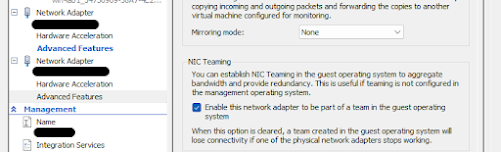
- Implement a Bridge in the VM (use Server Manager)
pro tip: assign any static IP etc. to the bridge, restart to bind services to the new Nic\IP
- Make some coffee, you earned it.



Comments
Post a Comment